Latest
Native GA4 vs. Custom RegEx: Navigating the New Era of AI Traffic
A while ago, we wrote an article to walk you through how to categorise and analyse your website’s AI traffic using a RegEx. A few days after we published our recommendations, Google announced their GA4 “AI Assistant” Default Channel Grouping.
While this native integration is a massive win for standardising AI metrics, it uses a conservative, forward-looking whitelist that underreports niche engines and completely locks out your historical data. By contrast, a custom RegEx approach provides total control and retroactive clarity – capturing up to seven times more unique AI traffic sources than Google’s default tool.
Read on to discover how these two methods stack up under the hood, and how to combine them for the ultimate AI traffic dashboard.
GA4’s “AI Assistant” Default Channel Grouping
According to Google’s definition “AI Assistants is the channel by which users arrive at your site from sources like ChatGPT, Gemini, Deepseek, Copilot, or Grok. It excludes Google’s AI Overviews and AI Mode”. This new Default Channel is automatically assigned by Google, so you don’t have to configure anything.
As made clear in Google’s definition, AI Overviews and AI Mode are not captured in this Default Channel Group, which only accounts for traffic originating from platforms where the user’s primary interface is a conversational chat window. When a user asks one of the chatbots from the auto-updated list a question, the AI generates text, includes a link/footnote back to your website, and the user clicks it – that session is defined as coming from an AI Assistant.
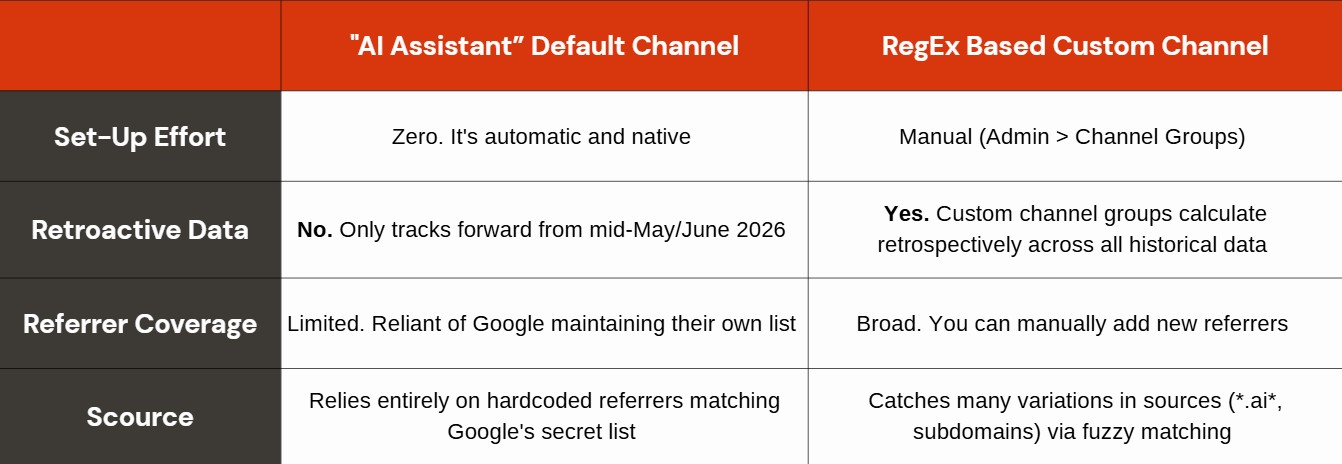
Google maps incoming traffic to an internal, backend “Source Categories” list (similar to how they auto-categorise Organic Social). If the referring URL matches their list, GA4 injects ai-assistant as the medium and (ai-assistant) as the campaign, which is why your standard reports look like the default rule is only looking for that medium and/or campaign. The real filter actually happens a step earlier via the hidden referrer list.
This channel grouping is not retroactive and will appear strictly forward-only from the date Google applied this to your property.
It was a phased, gradual rollout, which is standard for major GA4 updates. When Google first introduced the AI Assistant default channel group on May 13, 2026, the logic and code framework began deploying across Google’s massive global server network. However, it did not appear in every marketer’s dashboard simultaneously. Most properties did not see the new channel fully populate and reach broad availability until around the 2nd week of June 2026.
RegEx based AI Custom Channel Grouping
Instead of relying on Google’s predefined lists, the custom regular expression (RegEx) relies on creating user-defined rules directly inside the GA4 admin panel.
The biggest operational difference lies in where the data is evaluated. While Google’s solution looks for a specific, forced ai-assistant medium, the RegEx approach directly interrogates the raw source string (the referrer URL) passed by the user’s browser. A broad, pattern-matching expression, such as: *\.ai.*|.*openai.*|.*copilot.*|.*chatgpt.*|.*gemini.*|.*perplexity.*|.*poe.*|.*claude.*|.*andisearch.*|.*grok.*|.*phind.*|.*edgepilot.* is applied to catch any traffic where the referral source explicitly identifies as an AI platform.
This hands-on method offers two distinct technical advantages:
Total Control Over Scope: It isn’t restricted to a conservative whitelist. If an emerging chatbot or niche engine like Grok, DeepSeek or a custom enterprise wrapper sends traffic via a unique subdomain, the fuzzy matching of a well-crafted RegEx will catch it, whereas Google’s default group might bucket it as generic “Referral.”
Historical Recalculation: Because GA4 processes custom channel groups dynamically, your rule is retroactive. It scans backwards through your entire analytics timeline, immediately categorizing historical traffic from the past year.
Ultimately, this option turns the marketer into the data architect. It requires minor ongoing maintenance to account for new AI source subdomains, but it removes the analytics “blind spot” caused by waiting for Google to officially update its backend definitions.
Comparison
Our Findings
When comparing the number of sources captured through each method across our clients, we noticed that Google’s approach typically captured 2-5 different sources since the release of this new Default Channel Group whereas the RegEx based Custom Channel Group method captured between 9-35 sources during the same period due to its broader referrer matching.
Although many recent articles have reported that Perplexity seems to be absent from the AI Assistant channel, we found it to be present in some of our client reports as early as 11th June 2026, so it appears that Google are very reactive in maintaining the list they match against.
When to use which?
When to use the native GA4 “AI Assistant” Channel
As native channels carry weight, we recommend using the native GA4 “AI assistant” channel for top-level reporting. Having a line item next to “Organic Search” and “Paid Search” standardises AI traffic. If you are a small business or don’t have dedicated analytics support, the default channel ensures you get a baseline view of AI chatbot clicks without having to maintain a RegEx pattern over time.
When to use the Custom Channel RegEx approach
This should be used more to analyse historical trends. Since the native channel is forward-looking only, you cannot do true Month-over-Month or Year-over-Year comparison without a custom group or RegEx filter. If you are actively optimising a site to be “machine readable” and need to track minor platforms like Phind or Grok, Google’s default channel will underreport your success. Using your RegEx is mandatory for precision.
Our Recommendation
The native Default Channel and the Custom Channel can exist side by side, so you don’t have to choose one or the other. To understand the difference between the two for your own website you might find it useful to add a secondary dimension to your reports to show them next to each other. If you require a more granular breakdown you should set up an exploration that allows you to look at Session Default Channel Grouping, your Session Custom Channel Grouping and Session source/medium.
You should:
Check all your Custom Channel Groupings (not just the one related to AI traffic) to make sure none of them rely on the Default Channel Grouping “Referral” which may now have been classed as AI Assistant instead.
Assess when the AI Assistant was applied to your specific property and apply an annotation, so when you need to explain certain trends or spikes in the future e.g. when looking at year-on-year comparison you know what caused those changes.
Run a report regularly that looks at what sources or referrers are included in the Default Channel AI Assistant and if you spot any new ones that have been added, create an annotation to reference this. This means that you can clearly distinguish traffic increases caused by your optimisation (to make your site more machine readable) from Google simply adding a new referrer to the channel.
Review what sources are driving traffic to your site on a regular basis to maintain your RegEx.
Final Thoughts
The introduction of GA4’s native AI Assistant channel is a massive validation that chatbot referral traffic is here to stay. However, relying solely on Google’s out-of-the-box solution means operating with a self-imposed blind spot. As our data shows, a custom RegEx setup remains absolutely vital for marketers who require precision, historical context, and visibility into the long tail of emerging AI engines.
Instead of treating this as an “either/or” choice, the smartest analytical play is a hybrid approach: leverage the native channel for clean, high-level executive reporting, but maintain your custom RegEx to protect your historical trends and catch the traffic Google misses. By keeping both systems active and audited, you will ensure your website remains perfectly positioned – and accurately measured – as the machine-readable web continues to evolve.
For more information on how we can help you when it comes to all things data, get in touch with the team today.
Ready for change? Let's talk
Speak to Summit