Latest
Using Google Tag Gateway and Server-Side Tracking
In a summary
While Google Tag Gateway (GTG) and Server-Side Google Tag Manager (sGTM) sound similar, they perform slightly different and are complementary roles in a modern tracking infrastructure. Google recommend a hybrid approach where GTG handles loading the tracking scripts from the website’s root domain to bypass ad blockers, while sGTM manages processing and sending the data securely. Combining both tools creates a high-performance, cost-effective, and future-proof setup that ensures maximum data accuracy and security.
A while ago we wrote about the benefits of Google Tag Gateway (GTG).
Since then, we encountered a common question when transitioning a website’s analytics infrastructure to server-side tagging:
“Is Google Tag Gateway still necessary when using server-side GTM?”
The short answer is yes. While they sound similar, they perform entirely different roles. For a high-performance, future-proof tracking setup, Google recommends a hybrid approach where GTG takes care of the loading and sGTM manages the processing and sending.
To understand why, we must look at the difference between Loading and Sending.
Loading vs Sending
To track user behaviour, two distinct technical steps must happen:
- Loading (The Script): The website must download the tracking library (e.g. gtm.js) so it can listen for user actions.
- Sending (The Data): Once an action (like a purchase) happens, that event data must be packaged and sent away for processing.
Why use GTG alongside sGTM?
In Google’s hybrid recommendation GTG should handle the loading and sGTM the sending.
Many standard sGTM solutions still load the scripts from a Google hosted domain (e.g. googletagmanager.com) which means they are still subject to Intelligent Tracking Prevention (ITP) and ad blockers. Using GTG alongside a sGTM set-up makes the loading appear to originate from the website’s own domain.
While some sGTM solutions offer custom loaders they typically use a subdomain of the website which in many cases will still be blocked by ITP and ad blockers. However, GTG lives directly on the website’s root domain using a subfolder or path (e.g., (https://website.com/gtm-proxy)). This is known as a Same-Origin configuration and widely trusted, therefore typically accepted by ITP and bypassing ad blockers.
The Cost Factor
Serving static JavaScript files (gtm.js) to every single website visitor requires significant server computing power.
To force the sGTM server to handle this, the Google Cloud bill could scale up rapidly. By offloading the Loading phase to GTG (which utilises a low-cost Content Delivery Network like Cloudflare or Akamai), the sGTM server only pays for the high-value work of data routing.
The Maintenance Factor
While a developer can write a “custom loader” script to fetch GTM, this leaves them responsible for maintaining it. If Google updates its underlying tracking code architecture, custom loaders can break.
GTG is a native, Google-managed gateway. It ensures the website always loads the most up-to-date, compliant version of Google’s tracking libraries without manual developer intervention.
Summary Table
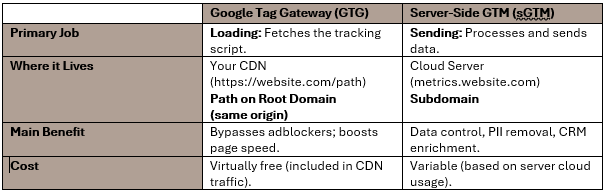
Combining both is the ultimate tracking setup goal. Google Tag Gateway ensures that 100% of eligible Google tracking scripts load successfully on the user’s browser, while Server-Side GTM ensures that the data collected is secure, enriched, and successfully delivered to the marketing platforms (Google, Meta, CRM, etc.).
For more information on how we can help you when it comes to all things data, get in touch with the team today.
Ready for change? Let's talk
Speak to Summit